Labels

Showing posts with label HFOSS. Show all posts

Wednesday, May 28, 2014

Fractionauts v2.0 Post-mortem, and Pixel Art Tips & Resources

We did it! Fractionauts got some great feedbacks. I'm fairly confident that it's the most attractive project during the final presentation.

You can check it out at https://github.com/chrisknepper/xo-fractions-game. Our team used https://github.com/kyung01/xo-fractions-game/ and did a huge fat pull request to merge with the main branch at chrisknepper.

Pixel Art Reskinning

Although I'm no professional artist, making game arts is one of the things I enjoy doing. This time I got the chance to flex that muscle and did a reskin of Fractionauts. There are a few tips and tricks to make such task easier. If you know any, please tell me! Making pixel art is very efficient and fun for 2D games.
The gameplay screen of Fractionauts.

Photoshop Setting

There are many tools you can use to create pixel art, ranging from Photoshop, Illustrator to MSPaint. 
Choose whatever tool you are most familiar with - the arts from Risk of Rain is made in MSPaint and they look FABULOUS.
I do my best work in Photoshop, and there are couple things you can do to make it easier.
  1. In Preference/General, set Image Interpolation to Nearest Neighbor. This will keep the pixels pixelated instead of blurry when the image size is changed.
  2. For the Paint Bucket tool, set Tolerance to 0 and deselect Anti-alias. This makes the bucket™ respect your pixels and does not over-paint it. Or in short, it makes the paint bucket work like the one in MSPaint.
  3. Use Pencil Tool to make all the pixellings you need. Load "Square Brushes" to paint squares. Which looks like pixels.
  4. Now try to erase it. Is the eraser blurring your image so much you want to chew a rabbit? If you feel as I do, you'll love this one: Change Eraser mode to Pencil. This turns off the anti-alias that Brush Mode performs. You can also change it to Block, which works as a fix-sized square eraser in any zoom level.
  5. For Texts, custom pixelated font is always the better choice because they are designed with pixelation in mind, but a common practice necessary is to change Anti-Alias (the one list option right to font size. It's so very easy to spot) to None. This prevents, again, the evil blurriness. We want our edges sharp.
    • A cool thing about fonts is that all fonts will be pixelated when they became too small. So, if you type the texts small in your desired fancy font, then rasterize it, then transform it to your desired size, you get to create some unique-looking text!
  6. Speaking of Transforming, change the Interpolation to Nearest Neighbor when using it because something something hard edge.
  7. Usually, when you zoom too close to the pixels, Photoshop automatically slaps a grid onto it. This could be distracting and annoying. Turn it off at View/Show/Pixel Grid.
And there you go! You have successfully degraded Photoshop to a more powerful MSPaint! Congratulations!

Art Direction

I've asked many people the simple question of "How to make pixel art". Their answers are similar.

Look at a style you like, and copy that.

My designer artist friend told me that. The Art director at Workinman told me that. A promising pixel art tutorial series said that.
When it comes to making an image interesting and useful, pixel art is no different from the other styles of artworks. And just as in other art styles, there is no silver bullet: many small details go into the look of it. My tip is to use a limited color palette, especially if you are going for a retro style of art. Systems back then don't support that many colors. Use kuler.adobe.com to search for and create your own color palette. Make sure the images look cohesive when put together. Make a mock-up of the gameplay scene first to determine how it'll look, then dissect it into art assets for the programmer to use. Don't use JPG compression.

For further tips and tricks, http://www.pixeljoint.com/forum/forum_posts.asp?TID=11299 is an amazing detailed tutorial addressing many common mistakes and practices. Check it out!

Wednesday, May 21, 2014

Fractionauts Playtest with 4th graders

On May 14th, we the RIT Humanitarian Free & Open Source Software class took a trip to Allendale Columbia School to have the 4th graders playtest our educational games.

Fractionauts, the game our team was working on, received great success! It was nominated for IGN Game of the Year
Setting up the gamespace

Fractionauts!

Some kid reached level 150. He's getting a badge.
Feedbacks from kids:
  • The level progression in the beginning is too slow. There's a lot of 1/2 in the first couple levels, and that was too easy to grab their interest. The fraction addition could be introduced earlier too - they don't start coming in till level 13.
  • Level generator that takes over since level 40 can use some difficulty tweaking
  • Bug Report! Sometimes the level generator generates multiple ways to get the right fuel amount, but only recognizes one of them as correct answer.

Feedbacks from Observation:
  • The current mouse icon replacement is a little too big, as players often mistake the middle of the icon as where the cursor is at. The hitbox for some buttons, such as the most important LAUNCH, is too small too, causing players and especially kids to get confused.
  • the BACK button needs to be more obvious. White text plz?
  • The positioning for fuel dividers are a little off near the top.


Finally, let's just take a moment and appreciate the fact that our fellow classmate, Danny Shumway, had a successful playtest of his horror game Eyes Open with 4th graders.


Wednesday, May 14, 2014

HFOSS Quiz #2

This is about the review of Rhetological Fallacies Infographic.

    When?

  1. When was the latest version of the infographic published?
  2. April 2012

    Who?

  1. Who wrote and designed this infographic?
  2. David McCandless
  3. Who did the research and collected the data?
  4. Marley Whiteside, Kathryn Ariel Kay, Peter Ayres.
  5. Who did the translation of this graphic?
  6. Gilles Peyroux

    Where?

  1. Where on the internet can this infographic be found?
  2. http://www.informationisbeautiful.net/visualizations/rhetological-fallacies/
  3. What sources did the authors use to create this visualization? List each one in the form of a hyperlink.
  4. WIKIPEDIA, FALLACYFILES.ORG, INTERNET ENCYCLOPEDIA OF PHILOSOPHY,SKEPTIC DICTIONARY, CHANGINGMINDS.ORG, LOGICALLYFALLACIOUS.COM, DOSTERS, E-DUCATION.NET, EVOLUTIONWIKI.ORG,  INFIDELS.ORG, PHILOSOPHICAL SOCIETY, SJSU.ED,TVTROPES.ORG, SANTAROSA.EDU, A CONCISE INTRODUCTION TO LOGIC (PATRICK J HURLEY),BEGINNERS GUIDE TO THE SCIENTIFIC METHOD (STEPHEN S CAREY)

    What?

  1. According to the graphic, how many major categories of fallacy are there? Please list each one.
  2. 6. "Appeal of the Mind", Appeal to the Emotions", "Faulty Deduction", "Garble cause and effect", "Manipulating Content", and "On the Attack".
  3. How many different langauges has this infographic been tranlated into? Please list each one.
  4. 5. German, Italian, Spanish, English, and German.
  5. Under what license was this infographic released?
  6. CC BY-NC 3.0

    Bonus: Why?

  1. Why might understanding these fallacies be useful or important?
  2. Being able to recognize these fallacies not only helps with arguing against other's fallacies, but also makes one's own argument better, smarter, stronger.

Tuesday, May 13, 2014

Literature Review: Fallacies

http://hfoss-fossrit.rhcloud.com/static/books/rhetological_fallacies.png


    Who
        David McCandless

    What
        Rhetological Fallacies

    Where
        http://hfoss-fossrit.rhcloud.com/static/books/rhetological_fallacies.png

    When
        April 2012

    The Gist
        A lively infographic about common rhetoric and logical fallacies. Categorized to "Appeal of the Mind", Appeal to the Emotions", "Faulty Deduction", "Garble cause and effect", "Manipulating Content", and "On the Attack".
        Whew, that was a lot.

    The Good
        1. Strong Graphical elements tat captivates attention.
        2. Large area of coverage.
        3. Categorization and color makes it easier to navigate.

    The Bad
        1. Would be easier to navigate if it's interactive instead of just a png.
        2. Would be easier to transfer the texts if it's interactive instead of just a png.
        3. Minor design flaws: Colors were helpful, but not very associative to content. Also, the top should not have the title touching the border.

    The Questions
    Hmm. There really isn't much to ask. The infographic is very extensive and well-written. The examples also help a lot, and the bottom of the graph shows where the data is coming from.

    Your Review
"Rhetological Fallacies" is an extensive infographic that teaches about common rhetoric and logical fallacies. Being able to recognize these fallacies not only helps with arguing against other's fallacies, but also makes one's own argument better, smarter, stronger. 1337/1337 leet hackers.

Saturday, April 19, 2014

Barcamp 2014 Spring: RIT FOSS Minor

By Mr. Remy Decausemaker, Professor, Event organizer, Google Summer of Code mentor

An Academic Minor on Free & Open-source Software Development

First of its kind in the nation. It's an inter-discipline minor open to all fields. Non-technical fields can take Technical Writing as advanced course instead of adv. development course. The great part is that as long as the project student's interested in contains open-source elements, it can be taken into the minor and drive its direction.

Course Mechanics

Attendance taken via IRC. Has supybot taking it.
Students are required to make development blogs and write homeworks on that. Blogging tracked via WebScrapers. For me, this eventually turned into my general development blog that also tracks my project plannings, thought and resource organizers, etc. A huge load of karma for that!
Assignments "Turned-in" via Pulls to the repo of course.
Requests & patches, bugfixes as homeworks and credits.
("If students wrote an automation to take attendance for them... they deserve that credits")

OLPC

Students make / contribute to projects for XOPC that is distributed to developing countries for education uses. Some projects are vastly successful (Sky Time), they went to Whitehouse.


Barcamp 2014 Spring: Synthesizer 101

By Dan Fuhry. @danfuhry

What's synthesizer?

It's a machine that uses artificial means to generate music. We synthesize chemicals by putting unnatural chemicals together. We synthesize sounds by putting unnatural sounds together.

Additive / subtractive

Additive: Adding multiple signals together. Some electric organs?
Subtractive: Subtract parts from a rich signal

History of Synthesizer, in one sentence

They kept getting smaller.

MIDI

Uses a clock signal that goes through all components to trigger stuff. Hmm. This might be helpful for recreating a synthesizer web app.

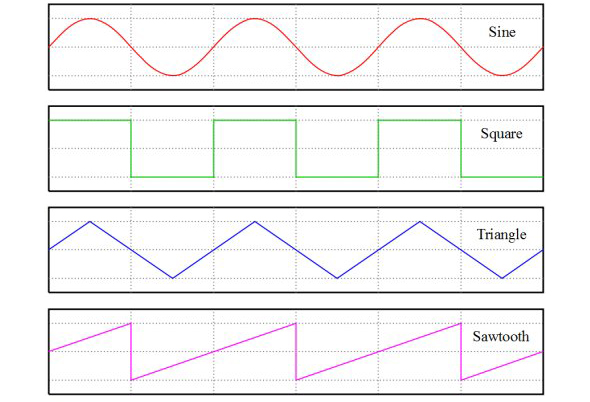
Waves

Filter

Cuts out certain frequency in the sound.

Modulation

Take a signal and use it to modify some other signal. e.g. LFO uses another wave form to control a low cut filter...? There are many different modulators.
Because everything in synthesizer can be described as a set of numbered attributes, these numbers can all be controlled.

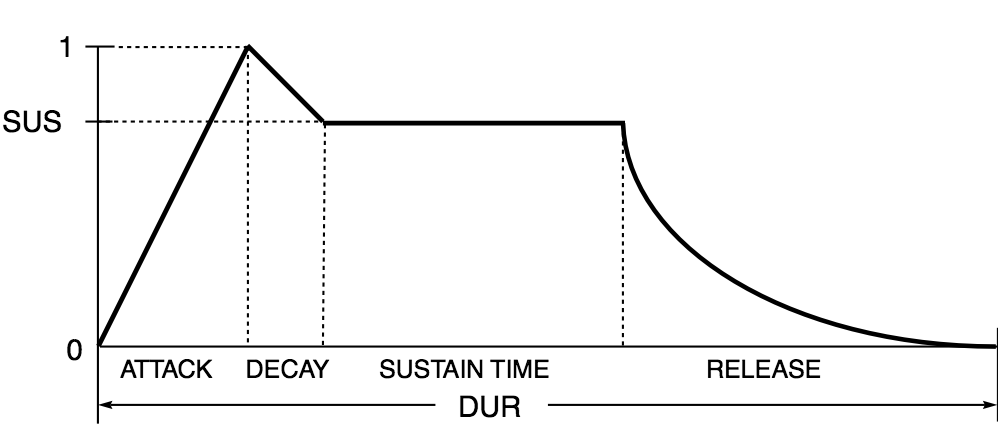
ADSR Envelopes

Attack, Decay, Sustain, Release

Analysis for Intro to Want You Gone, and Party Rock Anthem

Our presenter did a recreation of the intro to these two songs', live.
Want You Gone Intro
*Starts with a square wave
*Use a "sync" that offsets the width of a square wave
*LFO to synchronize the phaser
*A second LFO to put on the sync level of the square
*Something something phaser
*He did it! I don't know how but he did.
Party Rock Anthem Intro
*Two saw waves
*Slight detune, making it a little fatter
*Unison
*Done!

Wednesday, April 16, 2014

Team Proposal #2

Team Fractionauts v2.0


Team Members and Contacts:
Nekocoder           erycduhart010@gmail.com  
Jothle12                 jtl7264@g.rit.edu                     
Kyung                     kxc8603@g.rit.edu                   
PickledChicken   cxl6359@g.rit.edu                    


The Project In Question
Fractionauts is an astronaut themed "quiz game" targeted around 4th grade students interested in learning how to perform basic arithmetic with fractions. Hosted by Chris Knepper on Github, it designed for use on the XO, a Python-centered mini-computer that has often been distributed for use in developing areas.


Several potential contributions have been brought up so far. The ones we are most likely to pursue are: 

  • Packaging-Suggested by Remy himself, packaging and submitting (or simply patching) the game to an XO is a good idea.
  • Level Transition Animations - Simple movements of sprites, text fading, and "Correct Answer" text would help the overall experience of playing this game. 
  • Dynamically Generated Questions - Currently, the questions are all preset, meaning one could simply memorize the answers and their order instead of learning the subject matter. This is a high one on our list of to-do's.
  • Interactive Tutorial Level - A simple "How to play" level with instructions for first time users, perhaps accessible in the "Instructions" section of the game.
  • Slowness on XOPC - There seems to be a longer load time than we'd hope on XO's. Maybe we can find a way to speed up the process. This one is a little low on our current list of goals however.
  • Remedy inability to exit “How to play” screen - There is an instructions area already written out within the game's code, but no button available to exit the area. Obviously, this is an important one to fix.
  • Give Feedback and Hints to Players - This one is a quality of life improvement. Since the youth who may use this game are new to mathematics with fractions, we think that having the ability to ask for help from the machine would improve their experience.
  • Introduce Subtraction Questions - The Fourth Grade Math Curriculum for New York and Massachusetts both mention subtraction of fractions being taught at that grade level, so when we looked at our game and saw that there was no directly subtraction-specific questions, we felt that perhaps this would be a good addition to the game.
  • Level Timer - A way to "score" the player based on how they perform seems like it would help motivate players, and a "level bonus" timer would likely be a good way to facilitate this scoring.


The main contributors to this project so far use the handles Nolski, ChrisKnepper, ExplosiveHippo, Valeatory, Waterseas, and Emmix. Each one has their own copy of the main Github repository, each copy hosted using their main handle name (save for Emmix, which uses the Github name of jrs1498). It is currently assumed that our communications with them will be mainly through e-mail, IRC, and Github.


A full community architecture report on the project so far can be found here.


Outlook So Far

The Easy Parts, and How We Will Handle Them: 

  • Buttons to fix the "Instructions" screen - Buttons already exist within the code. Solving the problem will likely be as simple as copying code from one section of the project files to another.
  • Tutorial Level - Once the exit from the instructions screen is added, it shouldn't be much harder to add another button that leads to a specific question with instructions around it. 
  • Contacting the Leaders - As said before, the people who originally made this project stopped several months ago. However, several of them are likely on our campus, so finding them and making frequent contact with the ones who hold the project won't be a challenge. The first step is just e-mailing and setting up the initial lines of communication. After that, frequent contact should follow fairly easily.


The Hard Parts, and How We Will Handle Them:

  • Dynamically Generated Questions - Although the framework to make questions already exists, it is currently more oriented towards a "question pool" approach than spontaneously generated questions. Our first order of business with this is to find a way to quickly generate "answer parts" that will add up to a desired "final answer." After that, the challenge will be to attach the parts to our pool of images. If all else fails, we could do the "pick a random question from a hard-coded question pool" approach and preset answer parts.
  • Level Transition Animations - Most of our group members currently aren't familiar with the Python coding language, so animation in that environment will be a large step for all of us. By studying how the rocket sprite has been put on the screen, however, the only knowledge that will need to be pulled from outside the current project is making a "timer."
  • Introduce Subtraction Questions - The major reasons this will be difficult is that the assets currently available are currently oriented towards addition questions and the fact that how we approach subtraction questions will be heavily reliant on whether we use "fresh-made" or "pool-carried" questions. If we go the "pool-carried" route, the focus will mostly be on supplying art assets (siphons or differently sized tanks) and a scenario where REMOVING gas from a tank is logical. Meanwhile, if we go the "fresh-made" route, the art assets from before will likely be in use as our focus shifts towards making the "question" class flexible enough to make both addition and subtraction solutions available.
It hasn't been set as to what order or how many of our tasks will be tackled, but it likely will be something akin to the below:
*Note: The "/" means that these two items will likely be tackled in parallel.
  1. Fix the "Instructions" Screen 
  2. Dynamically Generate Questions
  3. Level Transition Animations/Tutorial Level
  4. Introduce Subtraction Levels
  5. Feedback and Hints to Player
  6. Level Bonus Timer
  7. Packaging/Speeding up the Program

Monday, April 14, 2014

Tracy Fullerton at RIT

I had the luck of enjoying a talk from Tracy Fullerton, from USC, about play-centric game design. It was such an inspirational talk and Tracy is a great story teller.
Plus we moved the fruits and cookies outside to Game Design Lab for the late night worker bees to enjoy.


Less is more when it comes to narrative( too!).

One thing she talked about is the benefit of having the narrative less detailed, making it simple and giving it many holes. As the player interacts with the loose framework, they fill the missing parts with their own interpretation and stories, thus making the experience personal. It's just like reading a book, where the readers conjure their own images. Tracy thinks it's paying respect to the player's intelligence.
In The Night Journey, there's no linear narrative. The death is a slow darkness that always unfold upon you. "Reflecting" would slow it down, but it's inevitable in the end. It's different from typical fast death in the games, but it conveys the feeling that it's a magnificent thing.


The importance of first impression and tutorial

"First moment": These games are minimal, and their tutorials are designed so it doesn't throw player out from the experience.
In The Night Journey, the big tree is right next to the player, and the game teaches the player to reflect on it, which is the major mechanic in the game. The teaching is a scripted event, but player deciding to look at and reflect on the big tree is self motivated.
Another example is that the graphic becomes blurry and disturbing when player moves too fast, making the players want to slow down, thus leading them to examine and reflect the surrounding.


Tracy's current project, Walden

Walden has you play as Henry David Thoreau who lived in the wood and wrote Walden about that period of his life. Everything in the game is there because Thoreau wrote about it. Player starts at the sweet and easy summer, collecting foods and fuels. As seasons progress, life in the world turns more challenging and stressful. There's no death in the game. When player failed to achieve his basic needs, gameplay turns into a grind; conversely, when player succeeded in planning ahead, the world becomes more lively. Finding interesting natural events pushes the player to be more curious. The positive feedback loop here is one that increases inspiration and curiosity.
This technique of having the experience as the end goal is quite valuable, for it can be used not only for games, but almost any product that is about creating experiences. The interaction side of game surely amplifies it, for it gives player the power to construct this experience themselves. Games can be lenses that reflects on personal experiences, and that's what Tracy wants to bring to the world.

Tracy's recommandation: The movie La Jetée.
Tracy's work: Cloud (with Jenova Chen), The Night Journey, Walden, A Game.

Wednesday, April 9, 2014

Curiculum Battle Royale: Massachusetts v.s. New York

We are trying to figure out the Math Curriculum Requirement for 4th graders in New York / Massachusetts, and choosing one of the standards to work with for our game Fractionauts.

One of the things we talked about for Fractionauts is the addition of arithmetic operations in the game, namely subtraction, multiplication and (this one is a bit intense) division. Turns out, a fourth grader in both these states would only need to know addition and subtraction for fractions inside 20. This would play well into Fractionauts' mechanics, since we already have addition down, and subtraction can be removing fuels from the tank into some empty storage units. The limitation of 20 might make level progression a bit repetitive, so we would need to add something more to make the game interesting. e.g. Timers and score multipliers. One of the things it mentioned was the multiplication of fractions with whole numbers. This could be implemented in the game by showing things like "three containers of 2/7 fuel"

As for the requirements, NY and MA are very similar about them, so similar that the battle royale resulted in a draw. Soooo do they both survive or do they both explode now?

  • Addition and Subtraction under 20
  • Understanding of multi-digit multiplication and division
  • Understanding of relationships between multiplication, division, addition, and subtraction.
  • Geometry: Draw angles and lines, and identifying shapes based on their lines and angles.
  • Unit Conversion
  • Measurement. One of the requirement is Measuring Angles.

Friday, March 28, 2014

Commarch Report: Fractionauts

Here's the report the team made on Google Doc.

I was away for GDC, hence not being able to contribute to the project. Sorry team!

My thought on the project:
Although git-by-a-bus and the Calloway Coefficient of Fail showed us some terrible results about this project, I feel optimistic about it, because this is a small project built and maintained by a few people that's very easy to reach. Git-by-a-bus or the contributor visualization also doesn't honor some tasks as much, such as the art asset commits from Waterseas.
The tasks in the near future is polishing and shipping the game. Transition effects, bug fixes, Badge implementations, etc. One good functionality to add is randomization of level contents, that'll add infinite replayability instead of the linear and one-time experience we have now. It would also be interesting to add a timer, and value that into the scores, so kids can show off their mad math methods.
It would also be nice to re-skin the game with professional arts, but we would need a good illustrator / designer for that.

Team Proposal: Fractionauts

Blog forked from Jordan Lehman, Eryc Duhart, and KyungHwan Chang.

Team Members, Contacts, and Titles:
Nekocoder           erycduhart010@gmail.com  
Jothle12                 jtl7264@g.rit.edu                    
Kyung                     kxc8603@g.rit.edu                   
PickledChicken   cxl6359@g.rit.edu                    


The Project In Question
Fractionauts, which is an astronaut themed "quiz game" targeted around 4th grade students interested in learning how to perform basic arithmetic with fractions. Hosted by Chris Knepper on Github, it designed for use on the XO, a Python-centered mini-computer.


Our intended contribution has not been set yet, but several options have been brought up: 

  • Packaging-Suggested by Remy himself, packaging and submitting (or patching) the game to XO is a good idea
  • Level Transition Animations
  • Dynamically Generated Questions
  • Interactive Tutorial Level
  • Slowness on XOPC
  • Remedy inability to exit “How to play” screen
  • Give Feedback and Hints to Players


The main contributors to this project so far use the handles Nolski, ChrisKnepper, ExplosiveHippo, Valeatory, Waterseas, and Emmix. Each one has their own copy of the main Github repository, each copy hosted using their main handle name (save for Emmix, which uses the Github name of jrs1498). It is currently assumed that our communications with them will be mainly through e-mail, IRC, and Github.


This post will be edited at a later time with a link to a full community architecture assessment.


Outlook So Far
The Bad: Initial organization of team members seems to be problematic, as communication lines between members are still being set up. In addition, I am unfamiliar with the Python language, so early programming needs may be difficult to fill. The specifics of our contribution also still need to be determined.

The Good: I can tell based on overall attitude and morale that the group is contains several hardworking individuals that are eager to do whatever task they are set to. There also seems to be a good amount of general knowledge within the group regarding the chosen project, despite how "young" the project is.

Monday, March 3, 2014

Bug Fix Assignment or: How I Learned to Stop Worrying and Contribute Back to the Community

The first time I contributed to an open source project on Github was during my co-op at Workinman. We needed a Haxe video player that can be compiled to both HTML and Flash. It was something new and I consulted the holy prophet of Google for guidance, who lead me to JarisPlayer. I encountered an issue, found a way around it, changed 5 lines of code, and made my first pull request! Initially I only posted the solution inside the issue, and the developer of JarisPlayer told me to do it correctly by providing a pull request. Thinking back, that was a highlight during my co-op. 

The bug fix this time probably took less time, but it felt a lot harder. 
Initially, I planned to find a bug by using the open-source Leap Motion Library for Processing for one of my data visualization project (NOTE TO SELF: Write a post about that later.) Be it fortunate or unfortunate, I did not encounter any problems. So I went to the Github Page for the library, and it does not have an issue tracker! With one hope squashed and eight left, I decided to work on fixing bugs for an image/video slider I'm using, called bxSlider. I use in the portfolio site for my designer friend Jack Wilson</selflessplug>, and even though bxSlider is the fourth most used sliders on the web, I encountered many problems with it. The project was well-maintained-not, the last commit made 6 months ago and the number of issues stacking to an alarming 266. I found out that I'm not the only one experiencing these bugs (whew), and there's people that already figured out a solution for some of them. Their solution however was only implemented in their branches, quoted in their issue discussions, without a pull request pointing back to the main repo. (46 pull requests) So I wrote two commits fixing one bug I found and implementing one of their solutions to a bug I'm encountering, and did it the right way - Pull Request and issue.

Links:
My pull request
Their discussion and fix

What I learned:

  • If the tool I'm using is open-source and I encountered problems, BE SURE to check out the discussions around it! This would've saved much time when I used it to build the site.
  • Fixing something that matters to me is so much better than just working on something irrelevant. In fact, I don't think I will ever do the latter. Bug squashing is often the most exhausting part in programming.
  • Github's collaborative coding environment is excellent. I put the URL of a developer's fix I'm implementing into my commit and my pull request, and these two activities showed up on that developer's issue! Similar things happened at my URL quote - Github replaced them with more descriptive hyperlinks.


Here's to hope these fixes get noticed by the maintainers!

Monday, February 24, 2014

First RocPy Meetup

Last week the FOSS class went to University of Rochester for the Rochester Python User Group Meetup.

We were given basic python intro lecture, and couple classmates went up there and gave lightning talks about their project that uses Python.

The intro-to-python-lecture talks mostly about data types. As M.Soucy pointed out, it was rather too basic and lacks some important concepts such as class and design patterns in Python. Still fun to play around arrays and tuples in the Python terminal window.

The lightning talks, hmm, I was expecting them to be about some new techy tools and techniques. Turns out it's mostly students introducing their projects for Advanced FOSS. One of the ideas I liked was to use raspberry pi to detect the barking of pet at home, and notifying the owner. It's very useful and realistic because a large amount of 911 complaints are about barking dogs. The attendees added more idea to it, such as making it learn what type of bark the owner's pet would make at a certain situation.

Overall, I had fun for the meetup, but it could definitely be better. I would rate it a solid 342/500 cheesecake.

Monday, February 17, 2014

HFOSS: Week 3

These weeks in HFOSS are very philosophical. We read about how open source development started, what important guidelines we shall follow when developing open source softwares, etc. 

We are going to RocPy tomorrow! Looking very forward to it. I hope to learn some new cool things that can be done with Python. Python as a language has some nature that makes it very accessible and makes one want to use it. (Relevant)

I hope we start working on projects soon, and I hope to see some lightning talks. I might do one about Perlin Noise.

Wednesday, February 12, 2014

HFOSS Quiz 1: Quiz one.

1. What are the titles of each Pillar?

 - Open Exchange
 - Participation
 - Rapid Prototyping
 - Meritocracy
 - Community

2. What are the titles of each General Principle?

 - Make it interesting and make sure it happens
 - Scratch an itch
 - Minimize how many times you have to reinvent the wheel
 - Solve problems through parallel work processes whenever possible
 - Leverage the law of large numbers
 - Document what you do
 - Release early and release often
 - Talk a lot

3. What are the similarities between Weber's eight principles, and the five pillars?

They both encourage building a better environment for user/developer participation and collaboration. They both encourage making information free, and they both try to make things quickly so that it can be looked at, played with and solved quicker.

4. What are the differences?

The five pillars focus more on encouraging the community, while the eight principles look at open source projects as building a software. It also gives more practical advises for developers on contributing to an open source project.

Bonus: Who's "keen analysis" did Weber "Draw Heavily" upon?"

Eric C. Raymond

Double-Bonus: What was the title of this "keen analysis."

"The Cathedral and the Bazaar"

Triple-Bonus: Where can this keen analysis be found?

http://www.unterstein.net/su/docs/CathBaz.pdf

Monday, February 10, 2014

Lit Review: Ch.3 What is Open Source and How Does it Work?

Who
 - Steve Weber

What
 - Ch.3 What is Open Source and How Does it Work?

Where
 - http://hfoss-fossrit.rhcloud.com/static/books/Weber-SuccessofOpenSource-Chap3.pdf

When
 - published in 2004

The Gist
 - The chapter talks about how open source was invented, what's special about it, and what to do to make it successful.

The Good
 - The comparison and contrast between open source and conventional software development
 - The 8 rules of open source
 - Different ways of organizing an open-source project

The Bad
 - Toooooooooo long. A thick read that could've been about more things.
 - Wish it could be more recent. It'll be interesting if it can look at Github.
 - It's a look at Open Source from an academic and more sociological standpoint. Can't say that's bad, but it's definitely not the full image.

The Questions
 - What notable examples are there where someone starts an open source project, then contributors take it away, starts its own organization, and leads to a successful project?
 - What's the ratio of profitable open source v.s. non-profit open source projects?
 - What are some Court Rulings relating to open-source? How does it impact the community?

The Review
8/10 - "One and a 3/5 thumbs up."

The chapter is a detailed and deep introduction to open source's history and present, albeit quite lengthy and dense. It did a good job explaining how and why open source works, what can make it work, and also goes into detail about licensing, organization, etc. I feel it can still show the information in a clearer way, and I wish it to have a more casual attitude instead of a scholarly paper with charts and data analysis. Overall, a solid 8.

Monday, February 3, 2014

HFOSS Assignment: FirstFlight Post(pre?)mortem

This is the first assignment in my Humanitarian...err...Free Open...um, S-omething...Software class. It takes us through the tools used in the class.

IRC: I've used mIRC before, but figuring out which slot to put in channel name and which to put in nickname still took a while. I found friends who took the class before on it, and asked them about the class and the chat channel.

Blog: Oh man, this part of the post can be an endless turtle tower. "I wrote that I wrote that I wrote..."
I didn't give much thought for which service to use. In the future I should hook the blog with my personal website.
This should be fun and rewarding. Good thing to have a record of thoughts to reflect upon.

Github: I learned to use Github from friends who took HFOSS. It's a great tool and I used it in this year's Global Game Jam. My other class, Data Visualization, is doing the same - hosting and gathering assignments on Github.

Patching: As I write the post the airport's internet is struggling to clone the project to my hard drive. It'll be fun to read through everyone's .yaml file when we turned them in.

DEAR PEOPLE FROM THE FUTURE: Here's what we figured out so far...

Credit for the name of this blog goes to http://xkcd.com/979/

I'm Changbai Li, a developer currently focusing on web and games. I also design, animate, make music and experiment, all in the name of "making cool shits". Well, "crafting digital experiences" sounds a lot more professional, but the former has a nice ring to it.

This blog is devoted to sharing problems, researches and solutions I faced during the making of these experiences, both in design and development. I put them out, so people from the future won't have to reinvent the Large Hadron Collider again and again.

You're welcome.